Get Productive Fast Software
Custom-engineered software designed to increase computing efficiency and streamline workflows.
File Manager
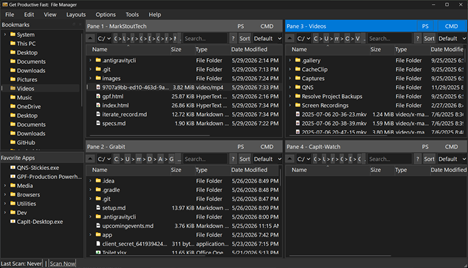
File Manager is a powerful Windows File management system for coders, vibe coders and other power users.
Features
- Three primary areas to the app:
- Individual folder panes (1 to 4)
- Bookmarks of frequently accessed folders
- Favorite Apps - a list of frequently used applications
- Panes can be vertical or grid layout
- Views : Brief, Detailed and Image
- Unique field layouts for different views
- Drag and drop between panes for copy or move
- Drag and drop files to other applications
- Immediate access to PowerShell or Command Prompt in a pane's folder
- Markdown viewer and editor
- JSON viewer and editor
- Text file editor
- Diverse right click file handling:
- Copy path to clipboard
- Copy filename to clipboard
- Copy text file contents to clipboard
- Add folder to bookmarks
- Add executable to Favorite Apps
- Send to
- Make this folder a Sendto destination
- Compress to zip
- Uncompress here
- Edit in Notepad
- Edit in Notepad++
- Edit in user defined editor
- File Properties
- Cut, Copy, Paste, Delete
- Rename
And it is free
Audio Tester
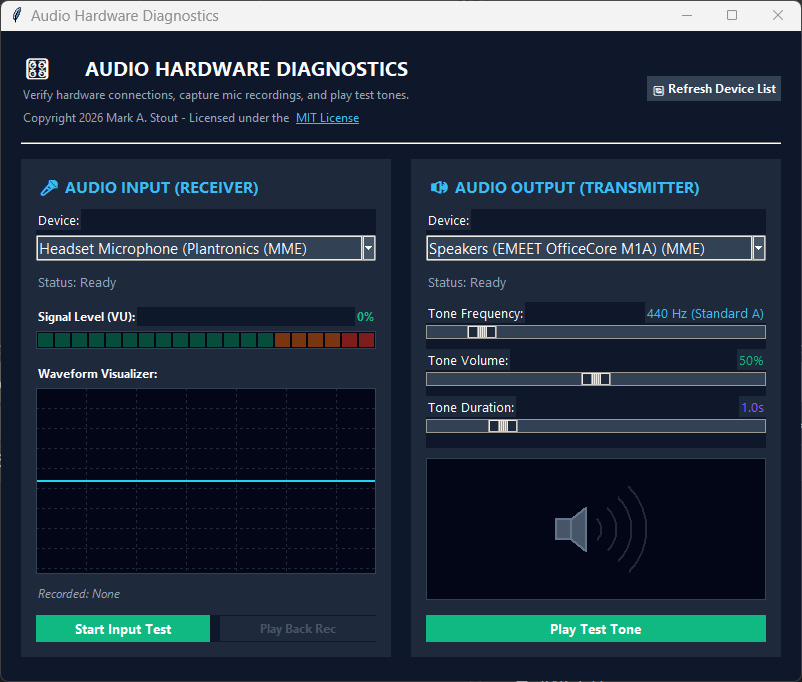
Audio Hardware Diagnostics is a standalone Windows utility designed to verify audio input and output hardware connections, monitor real-time microphone signal levels and waveforms, record and play back short microphone test clips, and transmit customizable test tones to speakers or headphones. It is useful for diagnosing issues with your audio devices hooked to your PC.
Features
- Audio Input (Receiver) Diagnostics:
- Real-time 20-segment Signal Level (VU) meter with peak-hold indicators
- Live animated oscilloscope waveform visualizer
- One-click mic recording and instant loopback playback
- Audio Output (Transmitter) Diagnostics:
- Clean pure sine wave test tone generator
- Adjustable tone frequency (100 Hz to 10,000 Hz, with preset Standard A 440 Hz)
- Configurable tone volume (1% to 100%) and duration (0.5s to 5.0s)
- Animated speaker visualizer during tone transmission
- Hardware Device Management:
- Automatic detection of all input microphones, line-ins, speakers, and headphones across MME, WASAPI, and DirectSound host APIs
- One-click dynamic device list refresh supporting hot-plugged USB audio devices
- Real-time status readout with active sample rate and channel configuration
- Standalone, portable Windows utility with zero external dependencies or setup required